Remote control and link management for JDownloader
MyJDownloader Browser Extension, developed by AppWork GmbH, is a browser-based interface for managing JDownloader instances via the MyJDownloader API. It is intended for users who manage downloads across multiple machines or from a distance. However, users should note that it requires a mandatory MyJDownloader cloud account to function, as it is not a standalone program.
Top Recommended Alternative

Remote link capture and centralized control
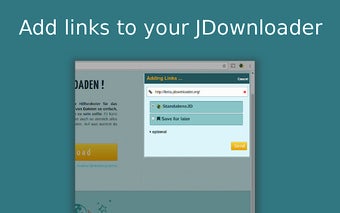
The extension’s standout capability is seamless remote link addition. From the browser toolbar or the context menu you can send links, images or selected text straight to any connected JDownloader instance. The extension allows for Selection Rules, where users can pre-define which instance receives specific file types automatically.
Furthermore, with Click’n’Load support, the MyJDownloader Browser Extension is able to intercept Click’n’Load buttons on websites that would otherwise require the desktop application to be open and visible. However, the extension does not download files itself; it acts as a bridge to the desktop client and the MyJDownloader cloud, enabling lightweight control without exposing the full JDownloader UI.
Streamlined workflows for active downloaders
Practical benefits focus on workflow efficiency and remote management. Typical use cases include collecting links while browsing, sending batches to a home PC, monitoring progress from another location, and solving captchas without returning to the host machine. Multi-instance support lets users choose which computer receives links when several JDownloader installations are linked to the same account. The extension allows users to add links without switching windows or leaving the browser.
Remote download management capabilities
MyJDownloader Browser Extension eliminates the need to copy-paste links manually into the desktop application. It allows users to solve download puzzles from a different floor or locations than the host PC, and simplifies the management of several computers running the software under one account.